Multi-Cloud Management Simplified: A Practical Guide for Growing Teams

I am Sanket Shah, founder and CEO of Deuex Solutions, where I focus on building scalable web mobile and data driven software products with a background in software development. I enjoy turning ideas into reliable digital solutions and working with teams to solve real world problems through technology.
At 11:42 p.m., the alert was not dramatic. Just a small red badge in the corner of a monitoring screen.
Then another one appeared. AWS showed rising latency. Azure had a policy warning. Google Cloud was fine, except the analytics job was burning through budget faster than anyone expected.
This is where multi-cloud management stops sounding like a cloud strategy term and starts feeling like a very real operations problem. This guide explains what it means, why companies use more than one cloud, and how to keep the setup from turning into three separate jobs wearing one name.
Quick Summary / Key Takeaways
Multi-cloud management means running, securing, monitoring, and controlling workloads across more than one cloud provider.
Teams use multi-cloud to reduce vendor lock-in, improve uptime, meet data residency needs, control cloud costs, and choose the right service for each workload.
The hard part is not spinning up AWS, Azure, or Google Cloud. The hard part is keeping identity, cost, security, observability, and deployment rules consistent.
A good multi-cloud setup usually needs Infrastructure as Code, centralized monitoring, shared tagging, policy checks, access control, and FinOps habits.
Research suggests vendor lock-in, portability, privacy, and security remain serious multi-cloud challenges, so governance should come early.
The simplest path is to start with one workflow, one cost model, and one operating standard before expanding across providers.
The Night the Cloud Bill Became a Clue
The first sign of a messy multi-cloud setup is rarely an outage.
It is usually a bill.
Someone opens the monthly cloud report and asks a reasonable question: "Which product team owns this spend?" Nobody answers quickly. A data pipeline moved last quarter. A test cluster stayed alive. A backup policy changed. A vendor migration paused halfway through and never fully restarted.
The cloud did exactly what it was asked to do.
That is the uncomfortable part.
In our experience, multi-cloud trouble often starts with good intentions. One team chooses AWS because the application stack is already there. Another team uses Azure because identity and enterprise systems are tied to Microsoft. The analytics team picks Google Cloud because BigQuery fits the job. None of those choices are wrong.
The trouble begins when each choice grows its own rules.
What Is Multi-Cloud Management?
Multi-cloud management is the practice of controlling workloads, data, security, costs, and operations across two or more cloud providers.
That might mean AWS plus Azure. It might mean Google Cloud plus a private cloud. It might mean a SaaS platform, Kubernetes clusters, and provider-native services stitched together behind one product.
The goal is not to make every cloud look identical. They are not identical.
The goal is to give your team one clear operating model: who owns each workload, how it is deployed, how it is secured, how it is monitored, and how its cost is explained.
Simple definition: multi-cloud management is how you stop cloud choice from becoming cloud chaos.
Hybrid Cloud vs Multi-Cloud: What Is the Difference?
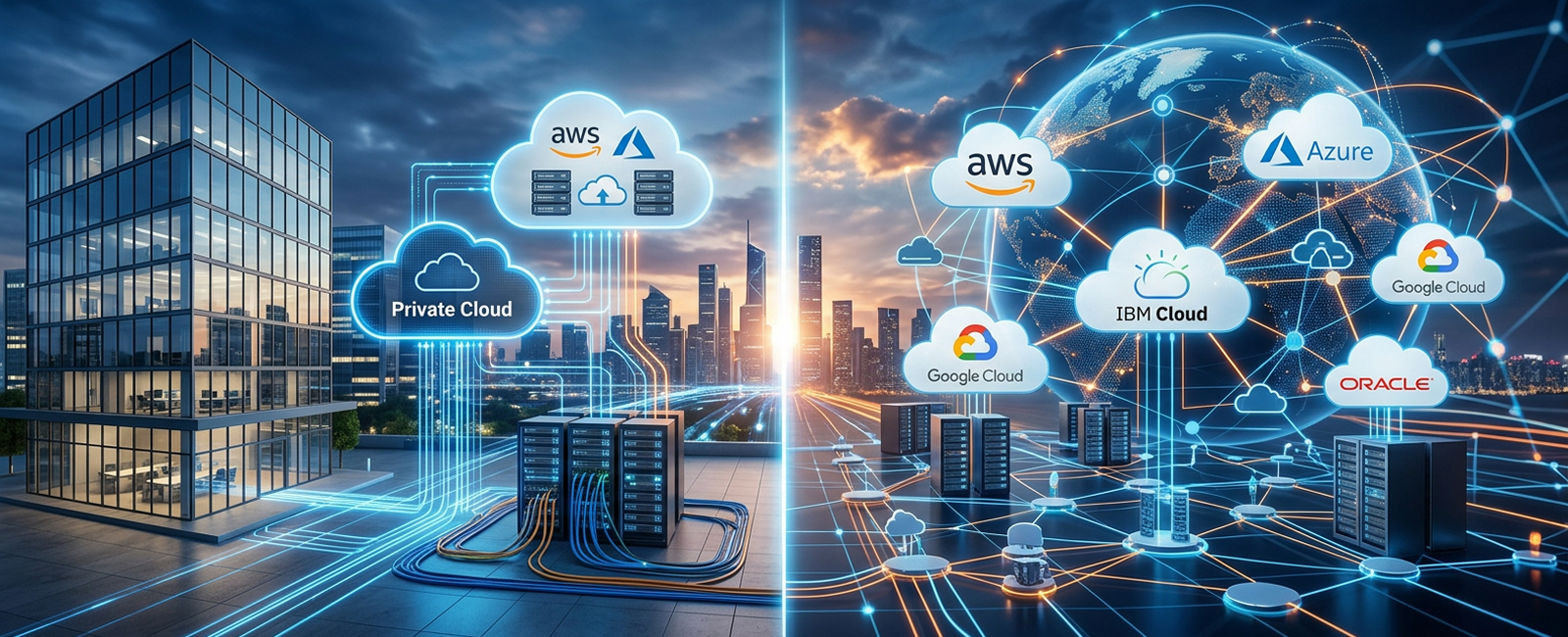
Hybrid cloud usually means a mix of private infrastructure and public cloud. Multi-cloud means using more than one cloud provider, often multiple public clouds.
They can overlap. Many real systems do.
A company may keep sensitive workloads in a private data center, run customer-facing apps in AWS, use Azure for identity, and send analytics to Google Cloud. That is both hybrid and multi-cloud.
Hybrid Cloud vs Multi-Cloud vs Single Cloud
| Cloud Approach | What It Means | Best Fit | Key Risk to Watch |
|---|---|---|---|
| Single Cloud | Most applications, data, and infrastructure run with one cloud provider | Smaller teams, simpler products, and early-stage platforms | Vendor lock-in, limited redundancy, and fewer fallback options |
| Hybrid Cloud | Private infrastructure operates alongside one or more public cloud services | Regulated workloads, legacy systems, and organizations modernizing in stages | Complex networking, integration challenges, and unclear ownership between environments |
| Multi-Cloud | Workloads are distributed across two or more public cloud providers | Larger platforms, regional requirements, resilience goals, and service-specific cloud choices | Fragmented costs, inconsistent security controls, and more complex monitoring |
| Hybrid Multi-Cloud | Private infrastructure is combined with services from multiple public cloud providers | Enterprises running legacy systems alongside modern cloud-native applications | Governance, identity, security, and operational gaps across multiple infrastructure layers |
Why Companies Use Multi-Cloud
Most companies do not wake up one morning and decide, "Let's make infrastructure harder."
Multi-cloud usually happens for practical reasons.
One provider has the best managed database for a workload. Another has better enterprise contracts. Another has strong analytics. A compliance need requires a specific region. An acquisition brings in another cloud footprint. A product team needs lower latency in a market where the current provider is weak.
There are good reasons.
There are also hidden costs.
The decision should come with a management plan, not just an architecture diagram.
The Main Reasons Businesses Choose Multi-Cloud
Avoiding vendor lock-in: Teams do not want every critical workload tied to one provider for pricing, APIs, outages, and roadmap.
Reliability: If one provider has trouble, some workloads may keep running elsewhere. This needs design work. It does not happen by magic.
Performance: Certain services run better, cheaper, or closer to users on one cloud than another.
Compliance: Data residency and industry rules may shape where data is stored, processed, logged, and backed up.
Cost control: Teams can place workloads where pricing and commitments make sense, but only if they can see the full bill.
Mergers and acquisitions: New companies often bring their own cloud providers, tools, and habits.
Specialized services: AI, analytics, databases, security tools, and deployment options differ across providers.
The Research Says the Hard Parts Are Still Hard
Two research threads are useful here.
Kiranbir Kaur, Sandeep Sharma, and Karanjeet Singh Kahlon reviewed more than 120 papers in Interoperability and Portability Approaches in Inter-Connected Clouds. Their work suggests that vendor lock-in is closely tied to portability and interoperability problems. Put plainly, if your apps and data cannot move cleanly, your cloud strategy has fewer exits than the slide deck promised.
A later review by Sijjad Ali, Dhani Bux Talpur, Adeel Abro, Khulud Salem Alshudukhi, Ghadah Naif Alwakid, Mamoona Humayun, Farhan Bashir, Shuaib Ahmed Wadho, and Asadullah Shah looked at security and privacy in multi-cloud and hybrid cloud environments. Their review points to recurring pressure around data protection, identity management, secure communication, compliance, and inter-cloud risks.
The lesson is not that multi-cloud is bad.
The lesson is that multi-cloud is unforgiving when governance arrives late.
How Multi-Cloud Management Actually Works
Think of multi-cloud management as five layers stacked on top of the clouds.
The first layer is visibility. You need to know what exists, where it lives, who owns it, and what it costs.
The second layer is deployment control. Infrastructure as Code tools such as Terraform can help teams define cloud resources in a repeatable way instead of clicking through three consoles.
The third layer is identity and policy. Access should follow roles, data sensitivity, workload type, and business need. Not guesswork.
The fourth layer is observability. Logs, metrics, traces, alerts, and incidents should tell one story, even when the system spans several providers.
The fifth layer is cost accountability. Tags, budgets, forecasts, unit cost, and anomaly alerts should be part of the operating rhythm.
When those layers are missing, teams may still have multi-cloud.
They just do not have multi-cloud management.
Multi-Cloud Problems and Practical Fixes
| Problem | What It Feels Like | Practical Fix | What Improves |
|---|---|---|---|
| No Shared Inventory | Teams lack clear visibility into who owns each cloud resource | Maintain a centralized asset inventory with mandatory tagging and ownership details | Faster cleanup, easier audits, and clearer accountability |
| Unexpected Cloud Costs | Spending increases without a clear explanation or accountable owner | Set budgets, configure anomaly alerts, and conduct regular FinOps reviews | Better cost forecasting, faster issue detection, and fewer billing surprises |
| Policy Drift | AWS, Azure, and Google Cloud environments follow different security and governance rules | Apply Policy as Code and standardized cloud guardrails | More consistent security, governance, and compliance across providers |
| Manual Provisioning | Environments are configured differently each time, increasing errors and delays | Use standardized Infrastructure as Code modules | Repeatable, faster, and more reliable environment deployments |
| Siloed Monitoring | Teams must check multiple dashboards and consoles to investigate incidents | Centralize logs, metrics, traces, and alerts into a unified observability layer | Faster troubleshooting, better visibility, and shorter incident response times |
| Scattered Access Controls | Too many users have broad or inconsistent permissions across cloud platforms | Implement role-based access control and identity federation | Reduced security exposure and more consistent access management |
| Slow Releases | Each cloud platform requires a different deployment process | Standardize CI/CD pipelines and Kubernetes deployment practices where appropriate | Smoother releases, fewer deployment errors, and more consistent delivery across environments |
A Common Example: One Product, Three Clouds
Picture a growing SaaS company.
The main application runs on AWS. Identity is tied to Azure because the enterprise customers already use Microsoft systems. Data analysis runs in Google Cloud because the analytics team likes BigQuery. The product is growing, and each team made a reasonable decision at the time.
Then customer support starts asking why some accounts are slow. Finance asks why analytics cost doubled. Security asks who approved a public bucket. Engineering asks which pipeline deployed the last change.
Everyone is asking the right question.
Nobody is looking at the same map.
A better setup might include Terraform modules for shared infrastructure, a standard tagging policy, one incident dashboard, centralized identity, and a weekly cloud cost review between engineering and finance. The outcome is not fancy. It is calmer: fewer unclear owners, fewer late surprises, and faster routing when something breaks.
That is what good multi-cloud work should feel like.
What Tools Help With Multi-Cloud Management?
Tools help, but tools do not fix unclear ownership.
You need both.
A practical multi-cloud toolkit may include:
Infrastructure as Code for provisioning resources across clouds.
Kubernetes for running containerized workloads with a more portable operating layer.
CI/CD pipelines for controlled deployments.
Cloud cost tools and FinOps practices for budgets, forecasts, and unit cost.
Observability platforms for logs, metrics, traces, and alerts.
Cloud security posture tools for configuration checks and risk visibility.
Identity federation for central access control.
Policy as Code for guardrails that run before mistakes reach production.
Backup and disaster recovery planning for failure scenarios.
This is where Deuex DevOps technology services fit naturally, especially when teams need help with Kubernetes, Jenkins, cloud-native delivery, and deployment automation.
For teams where security needs to be built into delivery from the start, Deuex DevSecOps services are a better internal path.
Multi-Cloud Tool Categories and What They Should Do
| Tool Category | What It Should Handle | Key Watch-Out |
|---|---|---|
| Infrastructure as Code | Provisioning, environment setup, and repeatable cloud resource deployment | Poorly designed modules can reproduce configuration mistakes at scale |
| Kubernetes | Container orchestration, workload management, scaling, and portability across environments | It does not eliminate the need for strong platform engineering and operational expertise |
| CI/CD | Automated testing, release approvals, deployment workflows, and change history | Pipelines should remain consistent and reliable across different cloud providers |
| Observability | Logs, metrics, traces, alerts, performance data, and overall service health | Excessive or poorly prioritized alerts can make critical issues harder to identify |
| FinOps | Cloud budgets, cost allocation, forecasting, optimization, and anomaly detection | Cost reports need clear ownership and action, not just dashboards |
| CSPM and Security Tools | Cloud misconfiguration detection, security posture monitoring, and risk visibility | Security findings need defined owners, priorities, and remediation workflows |
| Identity Federation | Centralized authentication and role-based access across cloud providers and systems | Overly broad roles and permissions can create significant security gaps |
| Policy as Code | Automated checks for security, cost, governance, and compliance requirements | Policies need regular review as regulations, teams, and infrastructure requirements changeThe Cost Question: Why Multi-Cloud Can Get Expensive Fast |
Multi-cloud can reduce waste. It can also create waste in stereo.
The difference is visibility.
Without shared tags, budgets, and cost ownership, every provider bill becomes a separate story. Compute is one story. Storage is another. Network transfer is another. Logging costs appear later and confuse everyone.
FinOps helps because it turns cost into a shared operating habit between engineering, finance, and business teams. Recent FinOps Foundation reporting suggests the practice is moving beyond cloud bills into broader technology spend, which lines up with what many teams are feeling. Cloud cost is no longer a finance-only spreadsheet. It is an architecture signal.
If a workload costs too much, the answer may be rightsizing. Or caching. Or data lifecycle rules. Or fewer duplicate environments. Or a different provider.
You cannot know until the bill has context.
Security in Multi-Cloud: The Part You Cannot Patch Later
Security gets harder when every provider has its own terms, defaults, consoles, logs, and identity model.
A rule that works in one cloud may not map cleanly to another. A team may harden one environment but leave another with old permissions. Logs may exist, but not in the place incident responders expect. Backups may be running, but nobody has tested restoration.
That is not a tool problem alone.
It is an operating model problem.
NIST guidance on cloud-native DevSecOps is helpful because it treats Infrastructure as Code, Policy as Code, and observability as part of the application environment. That thinking fits multi-cloud well. If cloud rules live in code, teams can review, test, and repeat them. If rules live in scattered console settings, mistakes become harder to spot.
A useful starting question is simple: "Could we prove who changed this resource, why it changed, and whether the change passed policy?"
If the answer is no, the architecture is not ready yet.
How to Simplify Multi-Cloud Management
Start smaller than your ambition.
Pick one product or one workflow. Then standardize the operating rules around it. Do not begin by buying a giant platform and hoping the platform will create discipline.
A practical path looks like this:
Inventory workloads across every cloud provider.
Assign owners to applications, environments, data stores, and budgets.
Create a tagging standard that finance and engineering both understand.
Move repeatable infrastructure into code.
Centralize logs, metrics, and incident routing.
Set access rules around roles, not personal convenience.
Build policy checks into CI/CD pipelines.
Review cloud spend every week until the patterns become obvious.
Document which workloads can move and which are provider-specific.
Test recovery plans before an outage teaches the lesson.
In our experience, the turning point comes when teams stop asking, "Which cloud is this in?" and start asking, "What does this workload need?"
That is a better question.
When Should You Not Use Multi-Cloud?

Multi-cloud is not automatically better.
A small product with one engineering team may not need it. A startup still looking for product-market fit may be better served by one provider, simple deployment, and clean monitoring. A company without basic tagging, alerting, or access control may need to fix those habits before adding another cloud.
More clouds can mean more options.
They can also mean more meetings, more bills, more policies, and more late-night confusion.
Use multi-cloud when there is a real reason: compliance, resilience, acquisition cleanup, specialized services, regional performance, or strategic risk control. If the reason is just "everyone else is doing it," pause.
What to Ask Before Hiring a Multi-Cloud Partner
A good partner should not start by selling tools.
They should ask about your workloads, team structure, release process, security expectations, compliance pressure, and cloud bills. They should be comfortable saying, "You may not need multi-cloud yet."
Ask these questions:
Which cloud problems should we fix before adding more tools?
How will you map ownership across providers?
What should be managed through Infrastructure as Code?
How will cost allocation work across teams and products?
How will logs and alerts reach one incident workflow?
How will access control stay consistent?
What happens if one provider has an outage?
Which workloads are portable, and which are not?
What will the first 30 days of cleanup look like?
How will we know the work made operations easier?
If the answers stay vague, the project may stay vague too.
Ready to Make Multi-Cloud Easier to Run?
Multi-cloud should give your business more choice, not more confusion. If your team is juggling AWS, Azure, Google Cloud, Kubernetes, CI/CD, cloud spend, and security rules across too many dashboards, it may be time to simplify the operating model.
Talk to Deuex Solutions about building a cleaner multi-cloud foundation with practical DevOps, DevSecOps, automation, and cloud-native engineering support.
What is multi-cloud management?
Multi-cloud management means controlling workloads, costs, access, monitoring, security, and deployments across more than one cloud provider. It helps teams avoid running each cloud as a separate island.
Why do companies use multi-cloud?
Companies use multi-cloud to reduce vendor lock-in, improve reliability, meet data residency rules, choose the best service for each workload, and control risk across providers. It works best when governance is planned early.
What is the difference between hybrid cloud and multi-cloud?
Hybrid cloud combines private infrastructure with public cloud. Multi-cloud uses more than one cloud provider. A company can have both if it runs private systems along with AWS, Azure, Google Cloud, or other public cloud services.
How do you reduce cloud costs in a multi-cloud setup?
Start with shared tagging, budget owners, anomaly alerts, rightsizing, unused resource cleanup, and regular FinOps reviews. Cost control gets much easier when every resource has a clear owner and business reason.
Is Kubernetes enough for multi-cloud management?
No. Kubernetes can help with workload portability and container orchestration, but it does not solve cloud cost, identity, compliance, networking, data movement, or governance by itself. It is one layer, not the whole operating model.